HubSpot has been a household name and the most powerful CRM. With HubSpot CRM, you can manage all your customers and business contacts in one place.
The HubSpot integration on DuoNut connects seamlessly to your HubSpot CRM account and automatically syncs your business and customer contacts.
This guide will help you to connect your DuoNut to HubSpot, and it should only take a couple of minutes.
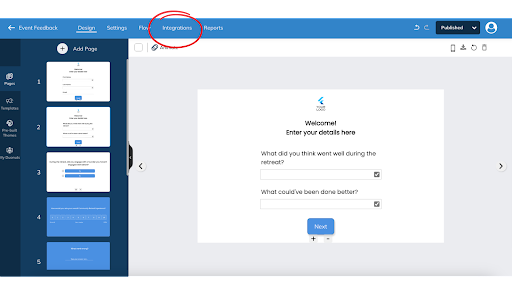
1. Go to the Design page of your selected activity.
2. Click Integrations tab on the top of the screen.
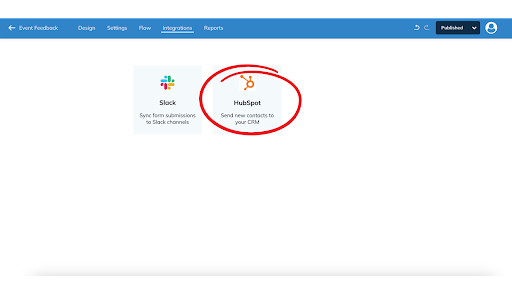
3. Select HubSpot.
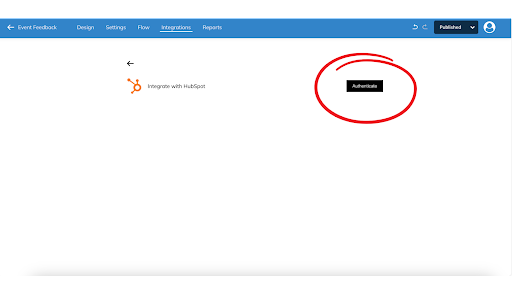
4. Click on Authenticate and complete the authentication process with your HubSpot account.
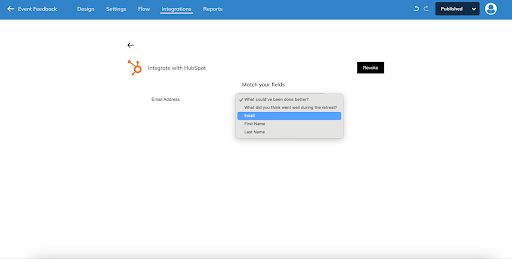
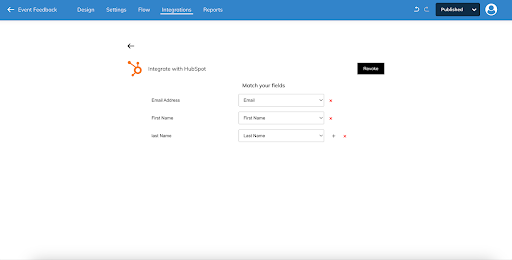
5. Next, map your HubSpot CRM fields to your form fields one by one. Click on the + icon to add more fields.
6. Click Publish to save the changes.
Here is the detailed video which shows the steps of authenticating, till the user receives the updates on their HubSpot CRM when the activity is taken by someone.
That’s it! Your DuoNut will do all the work as your team members collaborate on getting things done.