Slack is the most versatile collaboration platform that boasts impressive features that keep teams productive and up-to-date with their projects, tasks, and decisions.
The integration for Slack on Duonut sends your form and workflow submissions to Slack automatically, instantly creating updates on your Slack workspace. Now you can focus on getting the work done.
The integration for Slack is easy to set up. Let’s start!
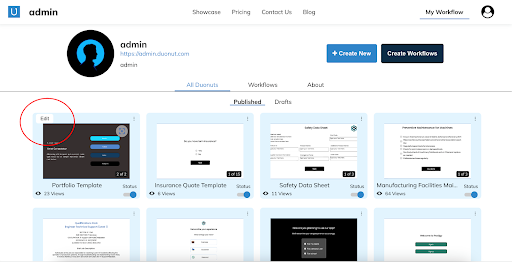
1. After login to Duonut, go to My workflow option located on the right top or go to the link - https://duonut.com/workflow -> Select the activity you want to get completion notification for in Slack or create a new activity -> Click on Edit.
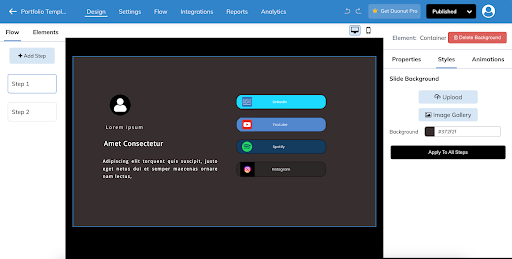
Clicking on Edit goes to the /design page. The page looks something like this:
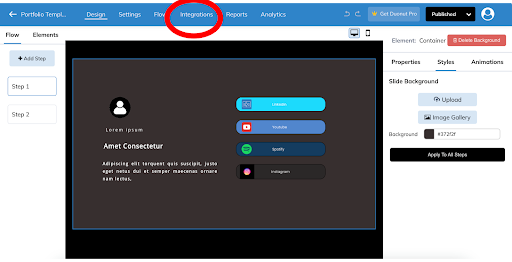
2. Click on the Integrations tab -> Click on the Slack.
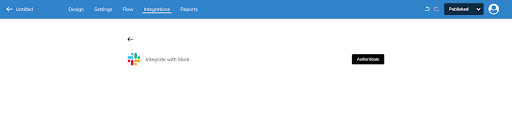
3. Click on the Authenticate button.
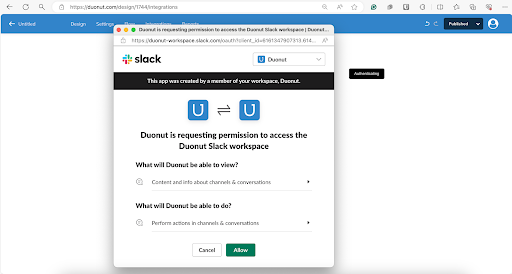
4. You’ll be asked to log in to Slack and give Duonut permission to access your workspace. This is also where you'll also be able to select the Slack channel you'd like to send form/survey submission notifications to. Once you've chosen your channel from the dropdown menu, click Allow.
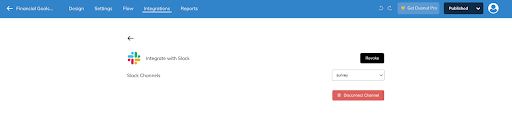
Now that you've given Slack permission to send notifications to your workplace, you'll be redirected back to your design page where you'll notice within the modal that Slack is actively connected to your form. Please note it Autosaves the configuration.
Note: if you ever want to turn off Slack notifications for this form or activity, simply click Slack within the Integrations tab and click on the Revoke button. You can also delete notifications to a particular channel by clicking on the Disconnect Channel button.
5. Head over to your Slack app—you’ll see a notification from Duonut that someone has added the Duonut integration to the channel.
6. Now sit back and watch the form submissions roll in.
Here is the detailed video which shows the steps of authenticating, till the user receives the updates on their Slack channel when the activity is taken by someone.
That’s it! Your Duonut will do all the work as your team members collaborate on getting things done.